How to Automate CRM Without Losing Data: A Security-First Guide for SMBs
If you're a business owner tired of manual data entry and spreadsheets, you've probably looked at AI automation. But one question keeps coming up: how to automate CRM without losing data? It's a valid concern. You've spent years building your customer database, and the thought of an AI tool mishandling or exposing that information is terrifying.
The good news is you can automate your CRM safely. The key is choosing a platform that prioritizes data privacy and integrates securely with your existing systems. This guide will walk you through the exact steps to automate your CRM workflows—without compromising data integrity.
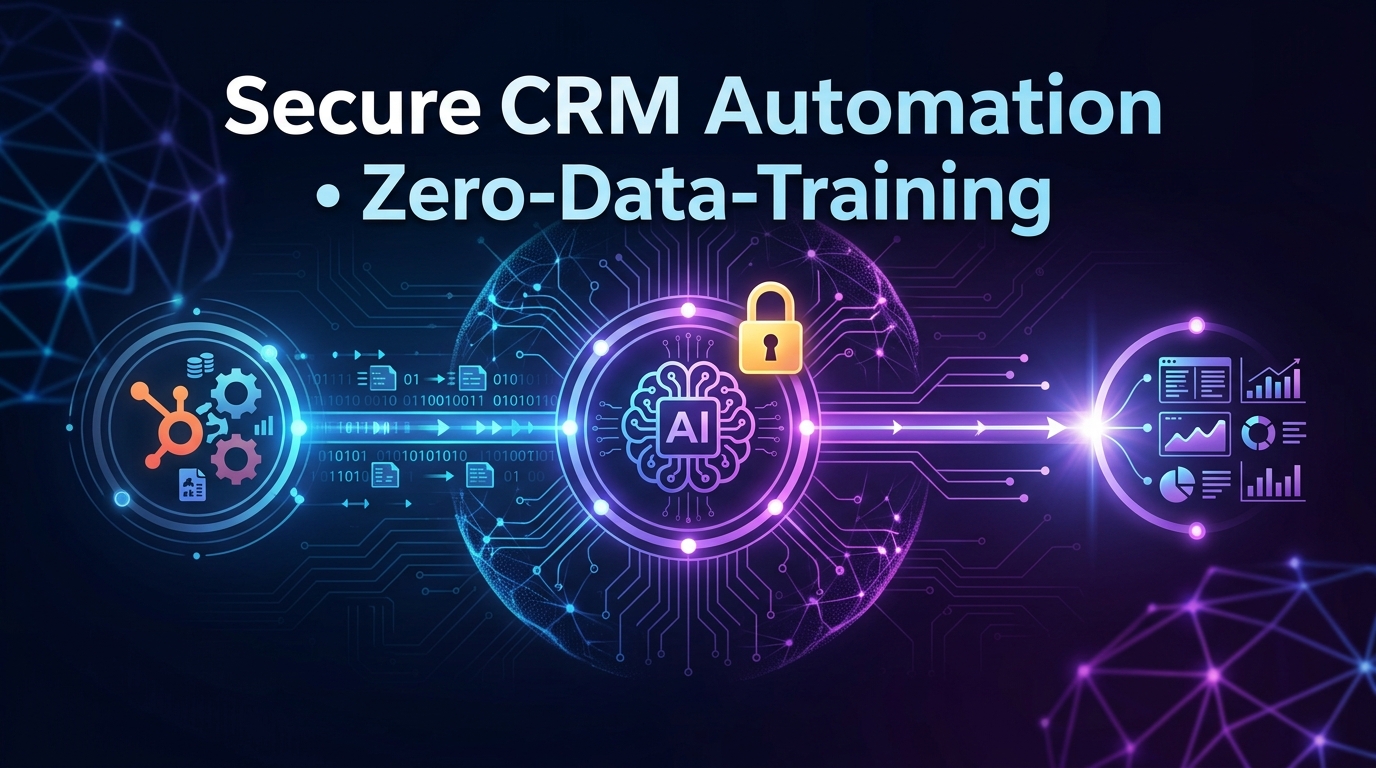
Caption: A secure AI automation pipeline showing data flowing from CRM (HubSpot/Odoo) through Septra's privacy layer to automated actions, with a lock icon representing zero-data-training.
Why CRM Automation Feels Risky (And Why It Doesn't Have To Be)
Automation means giving software access to your customer records, lead statuses, and sales history. It's natural to worry about data leaks, accidental deletions, or AI models "learning" from your sensitive information. According to a 2024 Gartner survey, 48% of SMBs cite data privacy as the top barrier to adopting AI for business operations.
But the risk isn't in the automation itself—it's in how the automation is built. Generic AI tools like ChatGPT process your data on their servers, often training their models on it. That's why you need a platform designed for business automation that never uses your data for training.
What Actually Puts Your CRM Data at Risk?
- Third-party API breaches – Unsecured connections between your CRM and an automation tool.
- Uncontrolled data access – AI agents that can read, modify, or export your entire database.
- Model training exposure – Your customer conversations becoming part of a public AI model.
- Human error during migration – Messing up field mappings when syncing data.
The Safe Alternative: Zero-Data-Training Guarantee
Septra AI operates differently. Our architecture ensures your CRM data is processed in isolated, ephemeral sessions. We never store, train on, or share your data with any third party. This is the only way to truly automate without losing data—or privacy.
How to Automate CRM Without Losing Data: A 5-Step Framework
Follow this proven approach to set up secure CRM automation. Each step is designed to maintain data integrity while eliminating manual overhead.
1. Audit Your Current CRM Data
Before connecting any AI tool, know what you're working with. Map out:
- Field names and types (e.g.,
Deal Stage,Contact Email) - Data volume (how many records will be processed daily)
- Sensitive fields (financial info, personal notes)
- Existing workflows (manual lead assignment, follow-up emails)
This audit prevents surprises when automation kicks in. For example, if your HubSpot pipeline has 50 custom fields, you need an automation tool that respects those mappings—not one that flattens everything into generic categories.
2. Choose a Privacy-First Automation Platform
Not all AI automation tools are equal. Look for these security features:
- Zero-data-training policy – The AI never learns from your data.
- SOC 2 / GDPR compliance – Third-party verified security standards.
- Granular permissions – Limiting AI access to only necessary fields.
- On-premises or isolated cloud processing – Your data stays within your infrastructure.
Septra checks all these boxes. Our AI agents connect directly to your HubSpot or Odoo instance using encrypted API keys, and we process commands without retaining any data. You get the benefit of automation without the liability.
3. Map Your Workflows with Fallbacks
Define the specific tasks you want to automate. Common CRM automations include:
- Lead scoring and assignment – Automatically route high-value leads to the right sales rep.
- Follow-up email sequences – Send personalized messages based on deal stage.
- Data enrichment – Append company info from public sources.
- Task creation – Remind team members when a deal requires attention.
For each workflow, build a fallback: what happens if the AI can't determine the correct action? For example, if a lead's industry isn't clear, the AI should flag the record for human review rather than guessing. This prevents data corruption.
4. Test in a Sandbox Environment
Never push automation directly to your production CRM. Septra offers a sandbox mode where you can simulate actions without affecting real data. Run at least 100 test transactions to verify:
- Data is written correctly to the right fields.
- No duplicate records are created.
- Sensitive fields remain untouched.
- Error handling works as expected.
5. Monitor and Audit Automations Regularly
Automation isn't set-and-forget. Schedule weekly reviews of AI actions. Look at logs to see:
- How many records were updated.
- Any anomalies (e.g., unexpected field changes).
- User feedback on automation quality.
Septra provides a full audit trail of every action taken by AI agents, so you can trace exactly what happened and when.
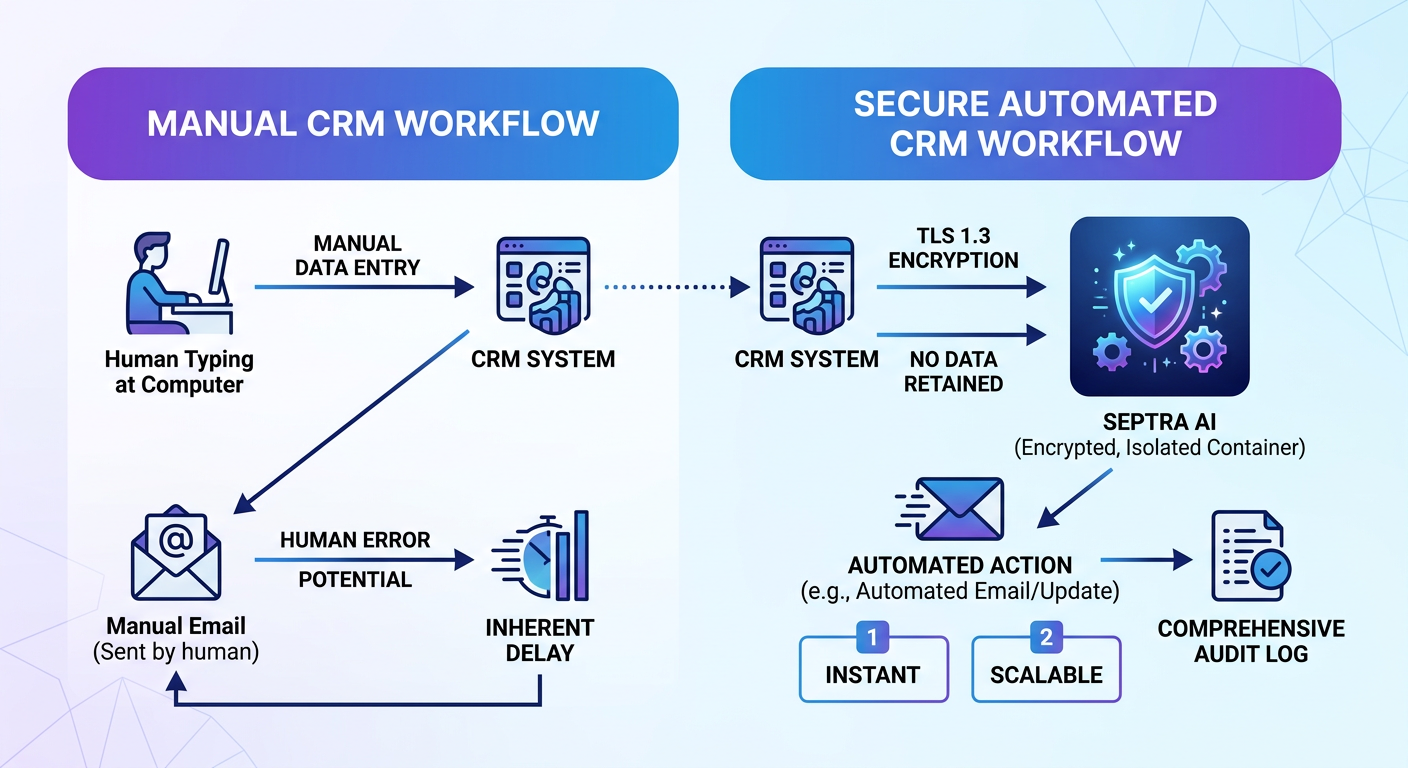 Caption: Flowchart comparing manual CRM workflow vs. secure automated workflow. Left side: human enters data → CRM → manual email. Right side: CRM data → Septra AI (encrypted, isolated) → automated action → audit log. Arrows labeled 'no data retained'.
Key Features of a Data-Safe CRM Automation System
When evaluating tools to automate your CRM without losing data, look for these non-negotiable capabilities.
Encrypted API Connections
All integrations should use TLS 1.3 encryption and OAuth 2.0 authentication. Avoid tools that rely on simple API keys without rotation.
Isolated Processing Sessions
Each automation request should run in a fresh, isolated environment. No caching, no session persistence. Septra's architecture spins up a secure container for every command and destroys it after execution.
Field-Level Permissions
You should be able to restrict AI access to specific CRM fields. For example, the AI can read Company Name but not Credit Score. This granularity keeps sensitive data invisible to automation.
Human-in-the-Loop Approvals
Critical actions (deleting a deal, merging contacts) should require a human click. Automated suggestions are okay, but irreversible changes need approval.
Real-World Example: Automating Lead Follow-Up Without Data Loss
Consider a construction supply company using Odoo CRM. Their sales team spends 3 hours daily assigning leads and sending follow-up emails. They want to automate this but worry about losing lead quality data.
Step 1: They audit their Odoo leads – 12 fields including Budget Range, Project Type, and Contact Notes (contains personal info).
Step 2: They connect Septra AI to Odoo with read-only access to specific fields. Contact Notes is excluded from AI visibility.
Step 3: They create a workflow: new lead with budget > $50K → AI generates a personalized email → sends via Odoo email integration → adds task for sales rep to call within 24 hours.
Result: Lead assignment time drops to zero. No data is leaked or trained on. The Contact Notes field stays untouched. Within a month, they close 20% more deals because responses are faster.
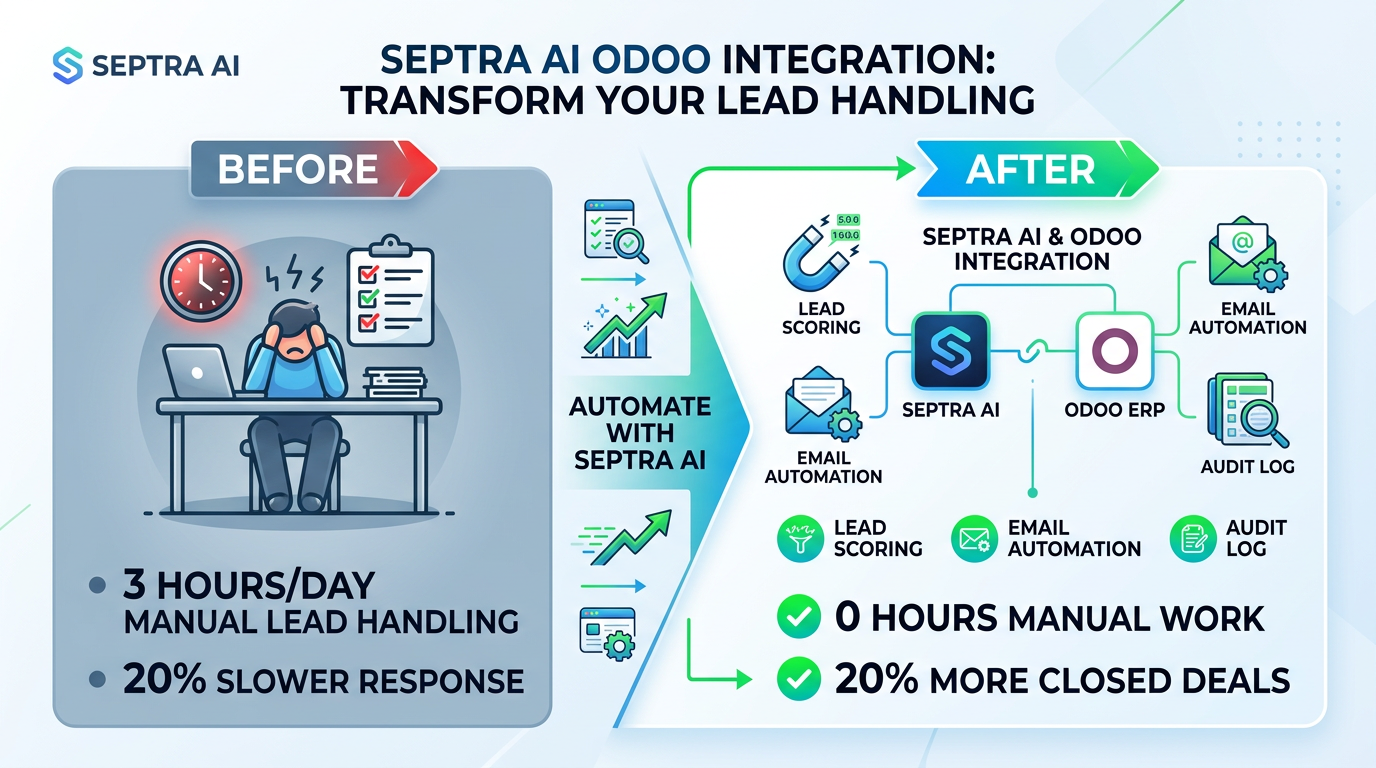 Caption: Before/after diagram: Left shows manual lead handling with 3 hours/day overhead. Right shows automated workflow with Septra AI Odoo integration, zero data training, lead scoring, and 20% increase in closed deals.
Common Pitfalls to Avoid When Automating CRM
Even with a secure platform, mistakes happen. Here's how to steer clear.
Pitfall 1: Over-Automating Sensitive Processes
Don't automate everything at once. Start with low-risk tasks like status updates or email reminders. Gradually expand to more complex workflows as you gain confidence.
Pitfall 2: Ignoring Data Synchronization
If you use multiple CRMs (e.g., HubSpot for marketing and Odoo for sales), ensure bidirectional sync is tested thoroughly. Inconsistent data between systems corrupts your pipeline.
Pitfall 3: Skipping User Training
Your team needs to understand what AI does and doesn't do. Train them on how to review AI actions and what alerts to watch for. This reduces fear and increases adoption.
Pitfall 4: Assuming All AI Tools Are the Same
Remember: most consumer AI tools train on your data. Only enterprise-grade automation platforms like Septra offer zero-data-training guarantees. Check the fine print.
How Septra AI Ensures Data Safety During Automation
Septra was built from the ground up for businesses that can't afford data leaks. Here's our architecture in plain English.
- Ephemeral agent sessions – Every time you trigger an automation, a fresh AI agent spins up, reads only the data you've allowed, performs the action, and disappears. No memory of your data remains.
- Encrypted end-to-end – Data in transit uses AES-256. Data at rest is never stored. We literally can't leak what we don't have.
- Compliance ready – Our infrastructure meets SOC 2 Type II, GDPR, and HIPAA standards for covered entities.
- No model training – Whether you use GPT-4, Claude, or our proprietary models, none of your CRM data is used to improve the models. Period.
This means you can automate CRM workflows—lead routing, email sequences, data enrichment—without ever worrying about your data being exposed or reused.
FAQ: Automating CRM Without Losing Data
Q: Can AI automation accidentally delete my CRM records? A: Only if you grant delete permissions. Most secure platforms (including Septra) default to read/write only. You can configure explicit delete approval steps.
Q: Will AI models learn from my customer data? A: Not with a zero-data-training platform. Always check the provider's model training policy. Septra guarantees we never train AI on your data.
Q: How do I migrate data from one CRM to another safely? A: Use an automation tool that offers field mapping previews and sandbox testing. Perform a full dummy migration before touching production data.
Q: What happens if the AI makes a mistake? A: Good automation tools provide rollback capabilities and audit logs. You can revert any action. Septra stores a complete history of AI decisions.
Conclusion: The Future of CRM Automation Is Secure
You don't have to choose between efficiency and data safety. With the right approach, you can automate CRM without losing data—and gain hours back each week. The key is using a platform that respects your privacy by design.
Septra AI offers exactly that: enterprise-grade automation with a zero-data-training guarantee. Connect your HubSpot, Odoo, or any CRM of choice. Start with a simple workflow, test it in sandbox, then scale.
Stop worrying about data loss. Start automating with confidence.
Ready to see it in action? Try Septra AI free for 14 days — no credit card required.
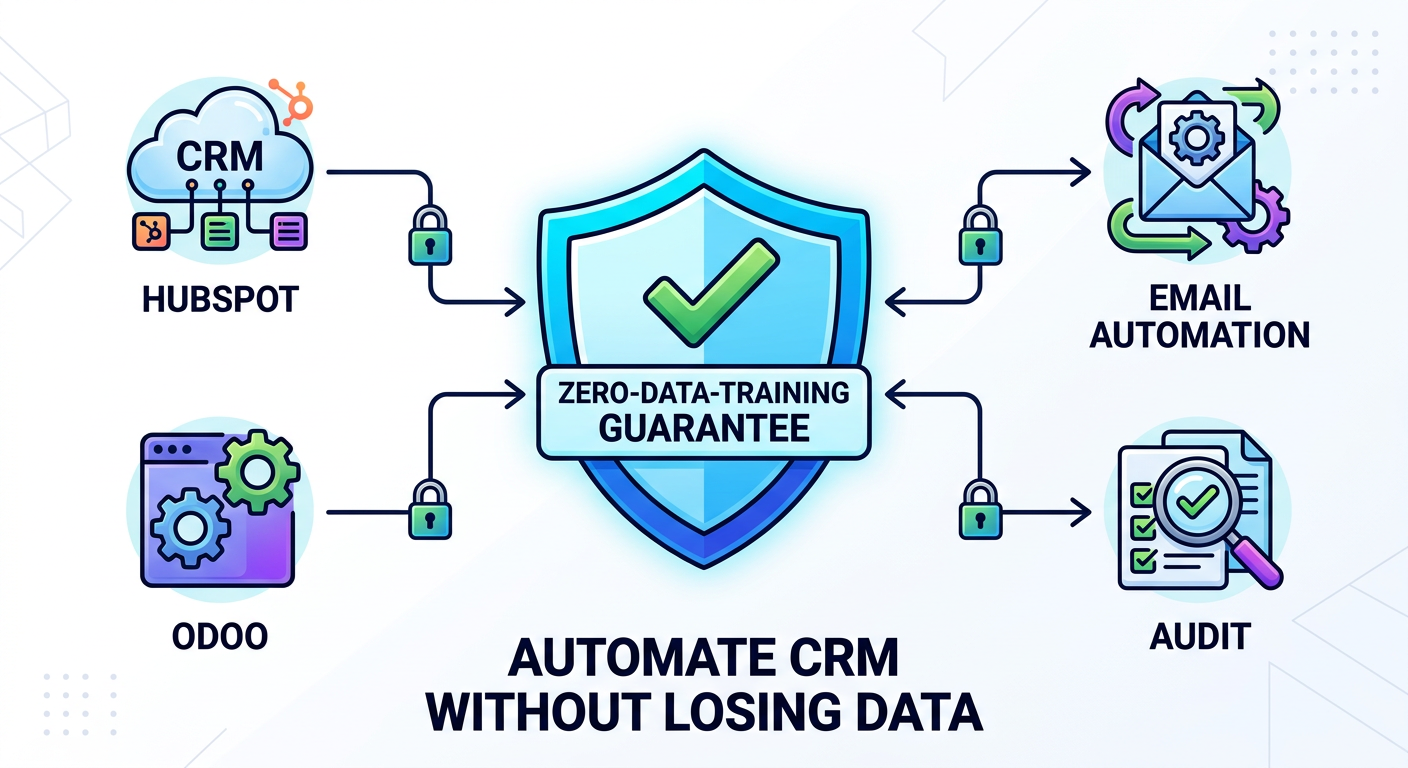 Caption: Final summary visual: a shield icon with checkmark labeled 'Zero-Data-Training Guarantee' surrounded by icons for HubSpot, Odoo, Email, Automation, with text 'Automate CRM Without Losing Data'.
Ready to build your own AI app?